NOTE: NOTE: This functionality is only available to clients with the SF Purchase module, which is an add-on module to the Single Family Program, Allotment and Loan Management modules.
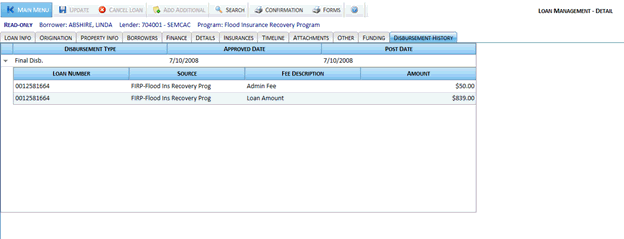
The Disbursement History tab is displayed after a loan has been approved for funding, and displays all purchase transactions during a purchase disbursement, including a breakdown of all sources, funds, and transactions which have been posted to a loan.
The Disbursement History tab is made up of the following fields:
Disbursement History: Displays all the disbursements made to the current loan.
Disbursement Type: Type of disbursement made to the loan.
Approved Date: Date the disbursement transaction was approved.
Post Date: Date the disbursement transaction was posted.
Click the Expand/Contract button
 next to a disbursement to display the associated fees in the sub-grid.
The sub-grid displays the following information:
next to a disbursement to display the associated fees in the sub-grid.
The sub-grid displays the following information:
Loan Number: Current loan number.
Source: Name of the source involved in the disbursement transaction.
Fee Description: Type of disbursement fee.
Fee Amount: Amount of the disbursement fee.